← All HBN Apps

HBN: Online Availability

Follow one product from Online Store publication to a deliverable address in the country you sell to, and see which setting stops it before a customer does.

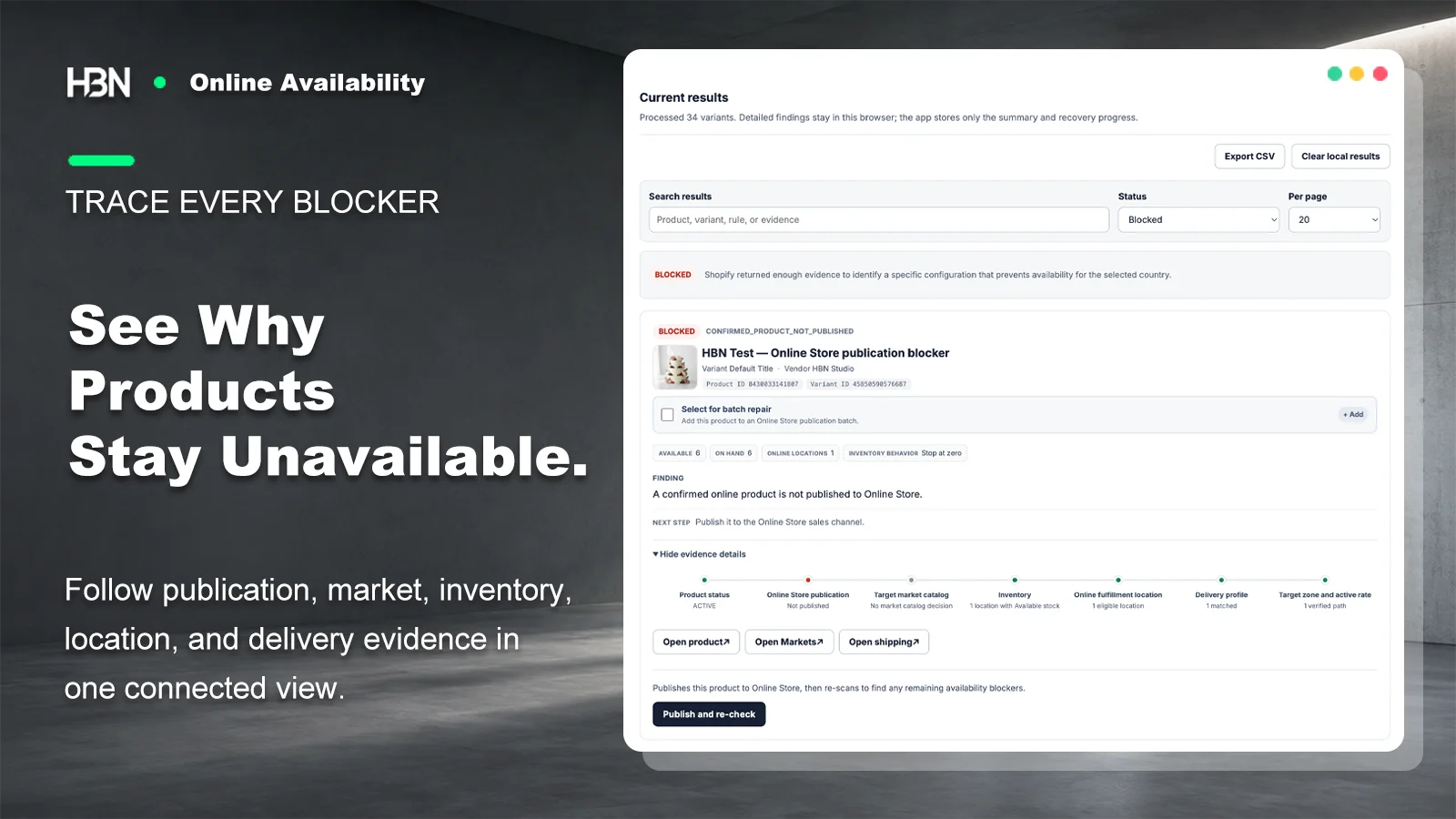
Blocked finding in Shopify Admin showing a product that is not published to Online Store, with its full availability evidence trail

In stock is not the same as available

Availability is produced by a chain of settings, not stored on the product.

The product editor says Active with six units on hand. A shopper in your main market sees nothing to buy. Both screens are telling the truth, because nothing in Shopify holds a single field called available.

What a customer can actually buy depends on publication to the Online Store channel, inclusion in the market catalog that serves their country, inventory that is sellable rather than merely on hand, a location that fulfills online orders, that location's delivery profile, a zone that covers the destination, and an active method in that zone. Every one of those was set by someone for a defensible reason. The failure usually lives in the combination, which is why checking the product page again rarely finds it.

The app reads your store. It does not rearrange it.

Inventory quantities, locations, Markets, catalogs, delivery profiles, zones, and rates stay under your control in Shopify Admin. This is a pure Admin app, with no theme extension and no storefront code.

An unavailable product is not automatically a broken product

Plenty of catalogs contain items that should never reach the online store: point-of-sale exclusives, wholesale-only lines, sample records, a seasonal product retired on purpose. A tool that flags all of them as errors produces a report nobody finishes reading.

So the scan separates two very different results. Blocked means Shopify returned enough evidence to name a specific setting that prevents the sale. Needs decision means the app can see the product is not selling online but will not guess whether that was the plan — you confirm the intent, or exclude the product, and it stops asking.

Start by writing down what should be available, and where

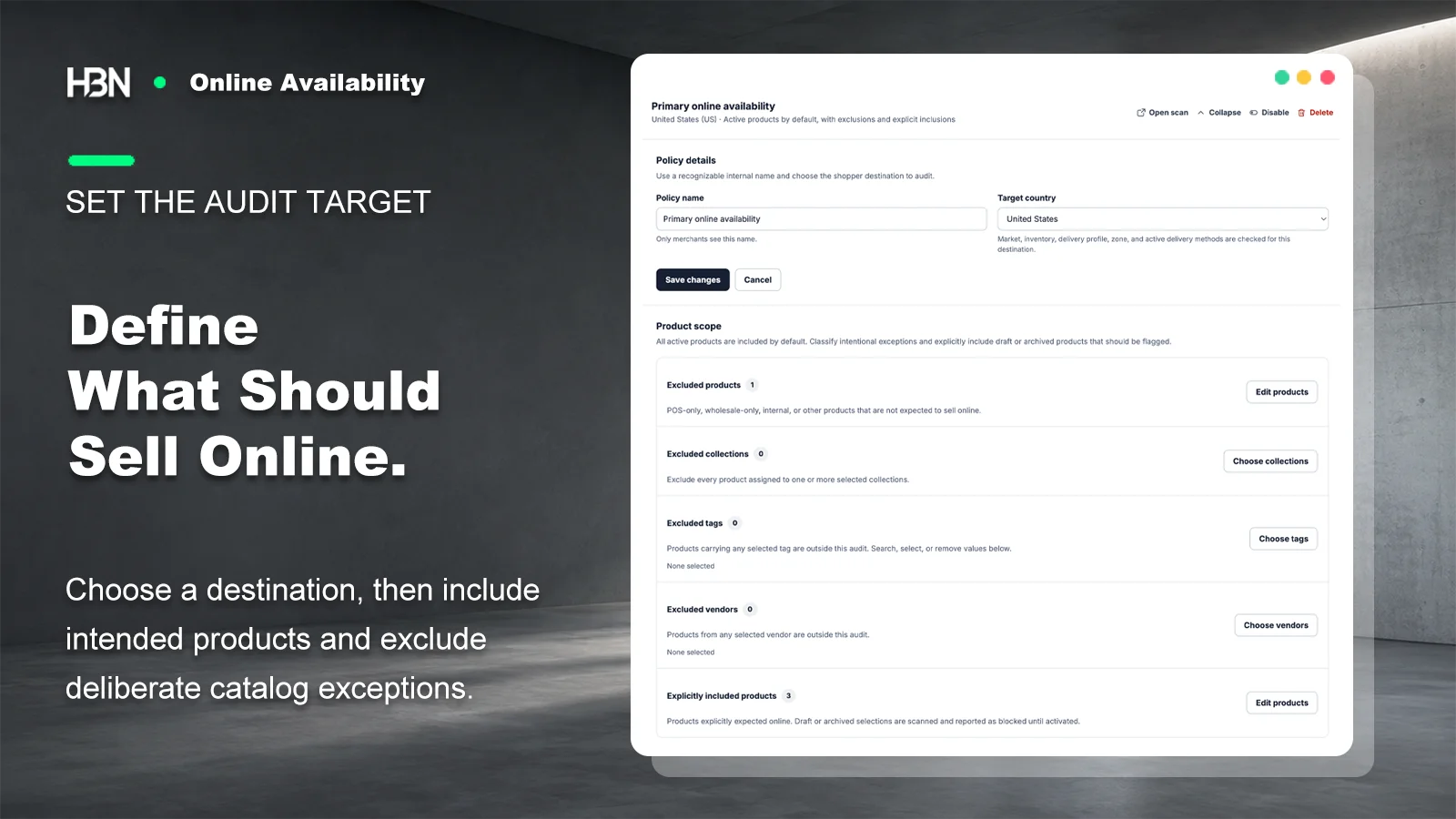
A policy names one shopper destination and the products expected to reach it. Active products are included by default. Exceptions are declared rather than discovered: exclude by product, collection, tag, or vendor, and explicitly include the draft or archived products that genuinely should be selling. Draft products stay invisible to the scan until you add them, so a catalog full of unfinished records does not drown the result.

Policy editor with a target country and product scope showing excluded products, collections, tags, vendors, and explicitly included products
Naming the deliberate exceptions first is what makes the remaining findings worth acting on.

Read the path, not just the verdict

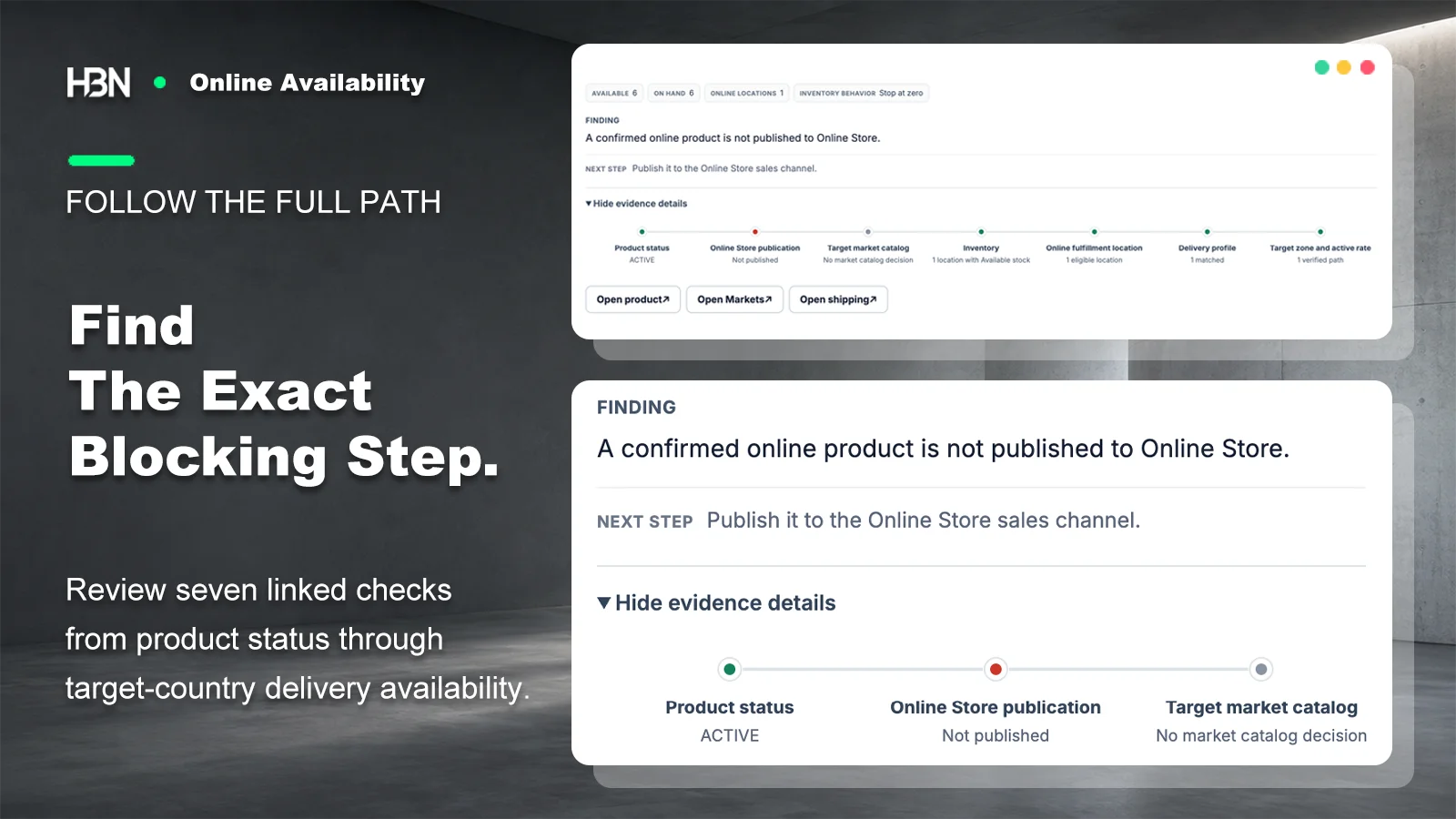
Each finding carries a rule code, a plain sentence describing what was detected, the next step, and the evidence behind it: available and on hand quantities, how many locations can fulfill online orders, the inventory behavior at zero, which catalog decision applied. The seven-step trail shows where the path held and where it stopped, and the deep links open the exact Shopify page — product, Markets, or Shipping and delivery — rather than leaving you to find it.

Two of the five statuses deserve a mention here. Configured means a static path exists, not that a checkout has been proven; a dynamic carrier quote still depends on a real address. Incomplete means Shopify did not return enough shipping evidence this time, which is a different thing from a confirmed blocker and is reported as such instead of being rounded into one.

Expanded evidence details for a finding, showing the seven-step trail from product status through target zone and active rate
The failing step is marked in place, so the answer arrives with its reasoning attached.

Repair only the two things an app should own

Activating a product and publishing it to the Online Store are safe, reversible, and unambiguous, so the app can do them for you after a preflight check, then re-scan to confirm nothing else was hiding behind the first blocker. Market catalogs, inventory, locations, delivery profiles, zones, and rates are not in that category. Those findings send you to Shopify with the evidence already gathered.

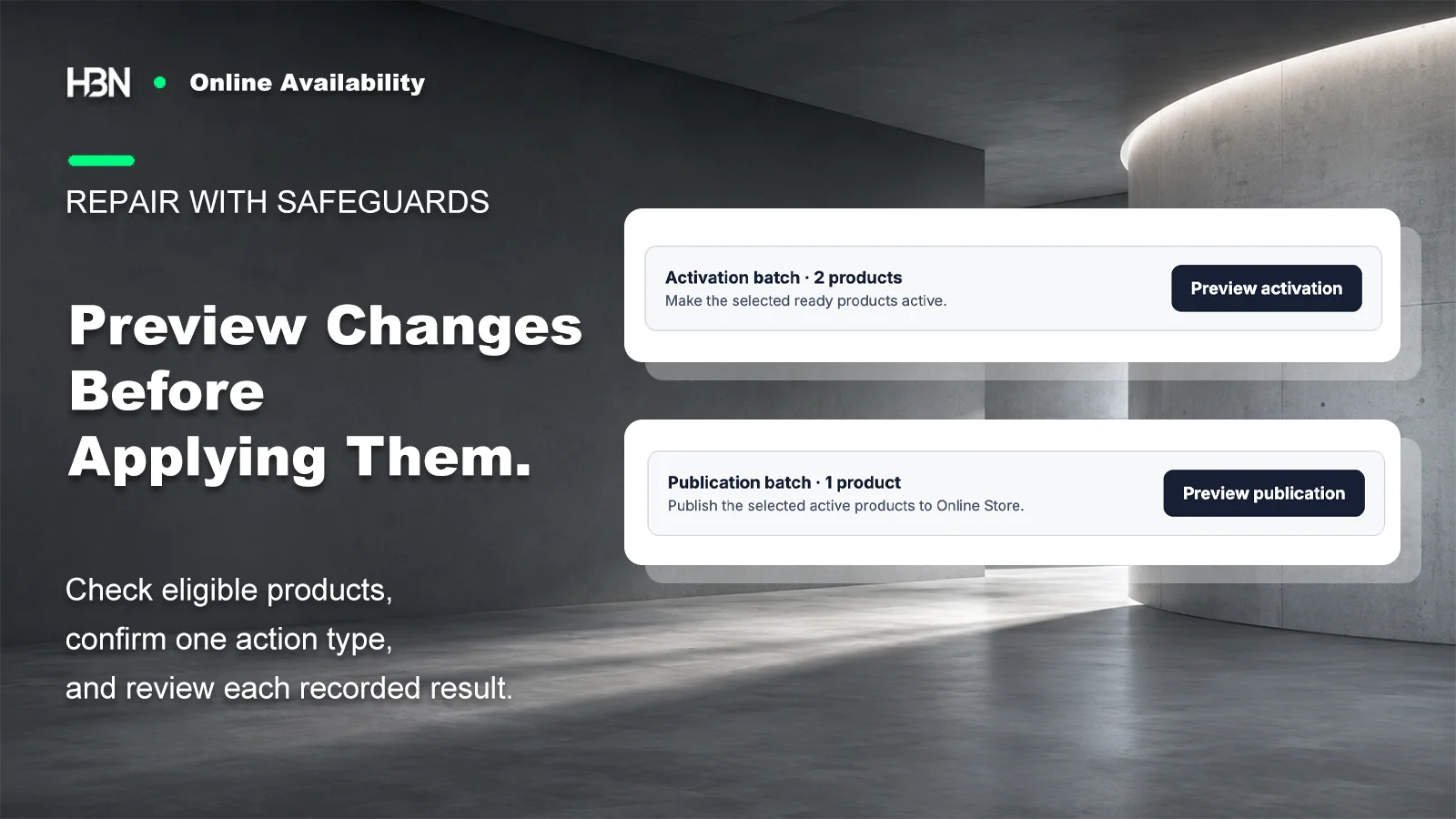
Pro groups the same two supported actions into separate activation and publication batches. Each batch is previewed, every item is checked again against the current Shopify state before it runs, and the result of each product — applied, failed, or skipped — is kept. A recent batch can be rolled back if a fresh safety check still passes.

Batch repair panel with a separate activation batch and publication batch, each with its own preview control
One action type per batch, previewed before it runs, instead of a single button that fixes everything at once.

Large catalogs and interrupted scans

The scan pages through products, variants, inventory levels, locations, publications, markets, and delivery profiles while respecting Shopify's throttling, so a big catalog takes time rather than failing. Progress is acknowledged as it goes: an interrupted scan resumes instead of starting over or reporting the same finding twice. Detailed findings stay in your browser, and the app keeps only the summary and the recovery position — the results panel includes a control to clear the local copy whenever you want it gone.

Free or Pro?

One destination is usually the whole problem.

Free covers a complete audit of a single target country with no catalog or scan limits. Pro exists for stores whose availability question is genuinely plural.

Current plan pricing is on the Shopify App Store listing.

Free — one complete policy

Audit one target country across the whole catalog, with full evidence, exclusions and confirmed intent, CSV export, and individual activation or publication fixes.

If you sell online from one market and one set of locations, this is the entire app you need.

Pro — several targets, batched repair

Keep up to twenty independent policies with their own countries, exclusions, and findings, then add previewed repair batches, per-product repair records, time-limited rollback, and 30-day scan trends.

The trigger is a second destination that behaves differently — a new market, a location strategy that only applies abroad — not a larger catalog.

Find the blocked products before a customer stops looking.

Install free and audit one destination across the whole catalog, with the evidence behind every finding.

View on Shopify ↗